

Whisper Auto Captions Redesign
Type
Redesign
Existing Product
Duration
2 Weeks
Jun-July 2026
My role
UX Audit
UI Design
Prototype
Although Whisper Auto Captions already provided AI-powered caption generation, its interface was primarily designed around technical functionality rather than the way video editors actually work. The information hierarchy made it difficult to identify what mattered at each stage, while the overall interaction flow felt disconnected from the familiar editing workflow of Final Cut Pro users.
In this redesign, I restructured the workflow, clarified the visual hierarchy, and simplified the interaction model. Instead of making users feel like they are operating a technical AI tool, the goal was to make caption generation feel like a natural part of the video editing process — with the right information, actions, and feedback presented at the right moment.
Why was it worth redesigning ?
Whisper Auto Captions is a desktop application developed by an independent developer for Final Cut Pro users. Built on OpenAI’s open-source Whisper model, it automates subtitle generation to reduce repetitive editing work and improve efficiency.
The open-source project has received 369+ GitHub stars, while its tutorial video has surpassed 100K views, reflecting its adoption among creators.
I was commissioned by the developer to redesign the product’s UI/UX, making AI-powered caption generation more intuitive and better integrated into the editing workflow.
Target Users
Video editors who want to spend less time on repetitive captioning and more time focusing on editing.


System Problem Workflow Gap
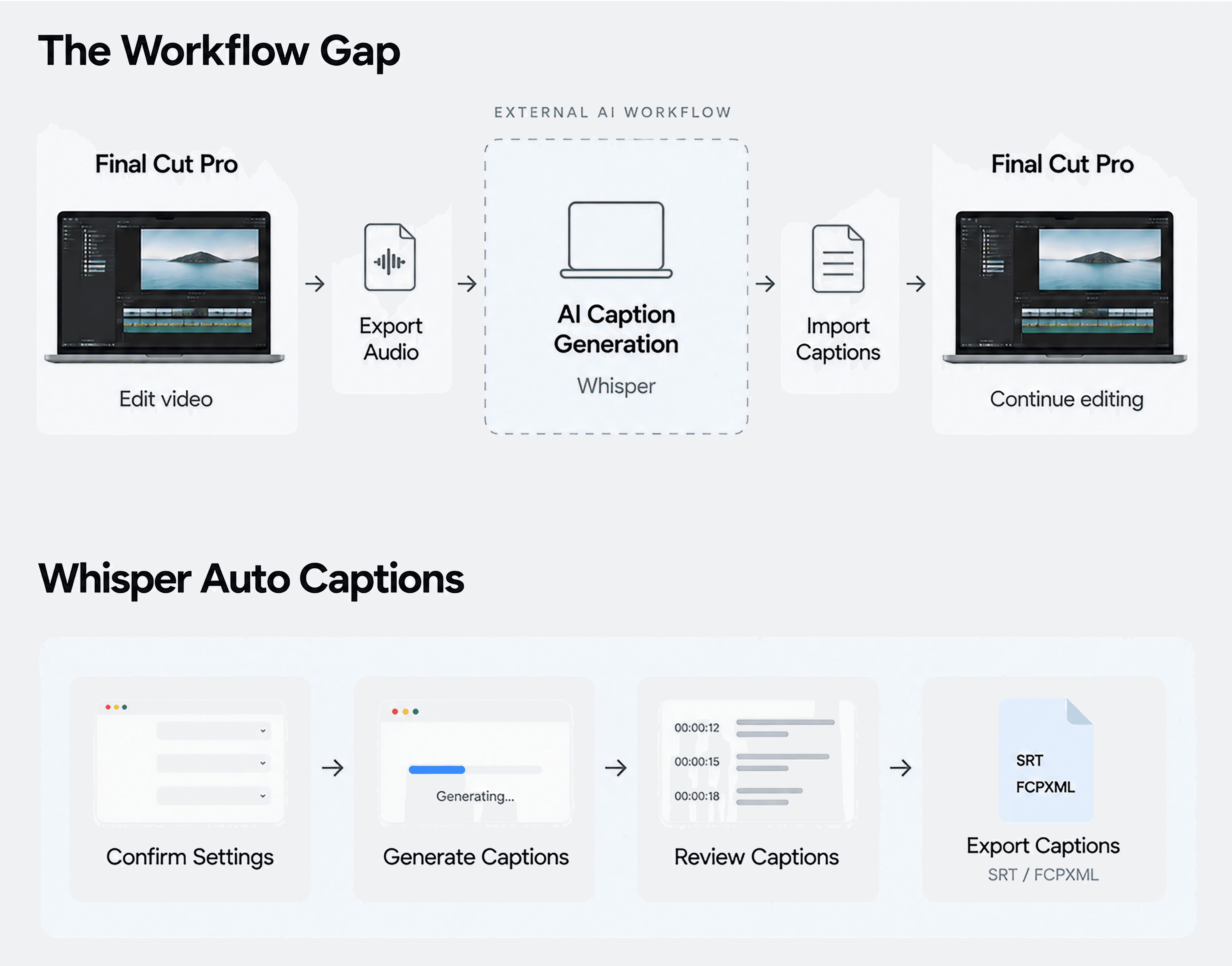
Using external AI models such as Whisper for caption generation requires stepping outside the editing environment.
Final Cut Pro supports caption creation within the editor, but using external AI models such as Whisper requires editors to move between their editing software and another tool — exporting audio, generating captions, and importing subtitle files back into the editing workflow.
Whisper Auto Captions was created to bridge this gap.

Whisper solved the workflow gap
— but its own interface introduced new friction.
Existing Product Issues
Before redesigning the interface, I first looked at how the existing product guides users through the captioning workflow.

What needed to change ?
Problem Definition
The interface does not adapt to the user’s current task.
The file input lacks clear guidance
It is not immediately clear where to drop a file, which format is required, or that audio needs to be exported from the editing software first.
The interface uses overly technical language
Terms such as “Model,” “Frame Rate,” and “Create” are not written from the editor’s perspective.
Users have to make technical decisions
Users need to configure several technical settings without enough context to understand what to choose.
The interface does not prioritize the current task
Different stages require different information, but the interface gives many actions and information similar visual weight.
Redesign Strategy

Workflow Restructuring
Decision
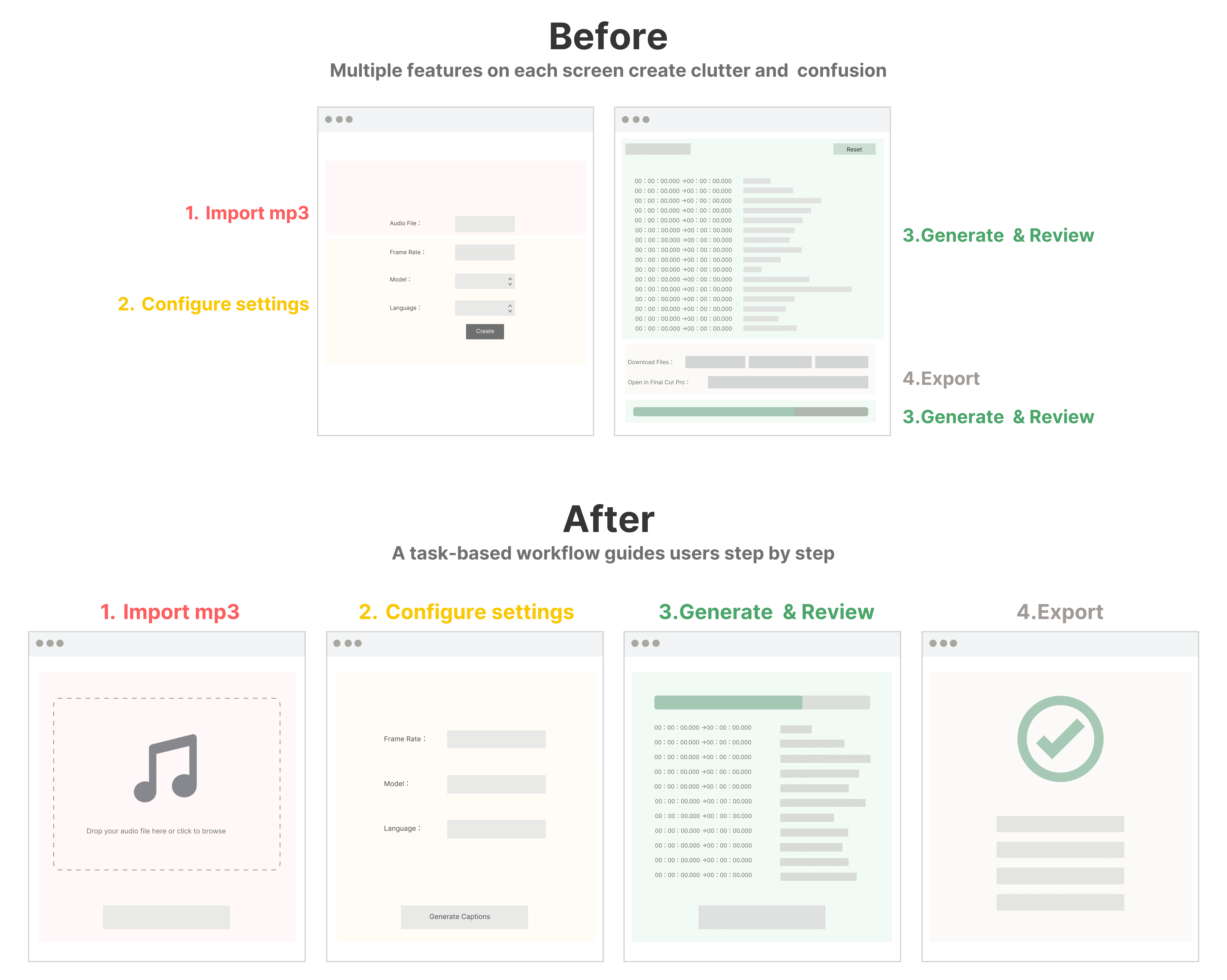
From feature-based organization to a task-based workflow.
Instead of presenting all functions at once, I organized the experience around what users need to accomplish at each stage—from importing audio and configuring settings to generating, reviewing, and exporting subtitles.

Speak the User’s Language
Decision
Use outcome-oriented language instead of technical terminology.

One Task · One Focus / Interface logic

Final Interface
Visual Feedback Through Character States
A character-based visual system provides lightweight feedback across different states, from waiting and processing to completion.


Why was it worth redesigning ?
Whisper Auto Captions is a desktop application developed by an independent developer for Final Cut Pro users.
Built on OpenAI’s open-source Whisper model, it automates subtitle generation to reduce repetitive editing work and improve efficiency.
The open-source project has received 369+ GitHub stars, while its tutorial video has surpassed 100K views, reflecting its adoption among creators.
I was commissioned by the developer to redesign the product’s UI/UX, making AI-powered caption generation more intuitive and better integrated into the editing workflow.
Whisper Auto Captions Redesign
Although Whisper Auto Captions already provided AI-powered caption generation, its interface was primarily designed around technical functionality rather than the way video editors actually work. The information hierarchy made it difficult to identify what mattered at each stage, while the overall interaction flow felt disconnected from the familiar editing workflow of Final Cut Pro users.
In this redesign, I restructured the workflow, clarified the visual hierarchy, and simplified the interaction model. Instead of making users feel like they are operating a technical AI tool, the goal was to make caption generation feel like a natural part of the video editing process — with the right information, actions, and feedback presented at the right moment.
Type
Redesign
Existing
Product
Duration
2 Weeks
Jun-July 2026
My role
UX Audit
UI Design
Prototype
Target Users
Video editors who want to spend less time on repetitive captioning and more time focusing on editing.
Why does this tool exist ?
- System Problem Workflow Gap
Using external AI models such as Whisper for caption generation requires stepping outside the editing environment.
Final Cut Pro supports caption creation within the editor, but using external AI models such as Whisper requires editors to move between their editing software and another tool — exporting audio, generating captions, and importing subtitle files back into the editing workflow.
Whisper Auto Captions was created to bridge this gap.
Whisper solved the workflow gap
— but its own interface introduced new friction.
Existing Product Issues
Before redesigning the interface, I first looked at how the existing product guides users through the captioning workflow.
What needed to change ?
Problem Definition
The interface does not adapt to the user’s current task.
The file input lacks clear guidance
It is not immediately clear where to drop a file, which format is required, or that audio needs to be exported from the editing software first.
The interface uses overly technical language
Terms such as “Model,” “Frame Rate,” and “Create” are not written from the editor’s perspective.
Users have to make technical decisions
Users need to configure several technical settings without enough context to understand what to choose.
The interface does not prioritize the current task
Different stages require different information, but the interface gives many actions and information similar visual weight.
Redesign Strategy
Workflow Restructuring
Decision
From feature-based organization to a task-based workflow.
Instead of presenting all functions at once, I organized the experience around what users need to accomplish at each stage—from importing audio and configuring settings to generating, reviewing, and exporting subtitles.
Speak the User’s Language
Decision
Use outcome-oriented language instead of technical terminology.

Key Language Changes

One Task · One Focus / Interface logic
Final Interface
Visual Feedback Through Character States
A character-based visual system provides lightweight feedback across different states, from waiting and processing to completion.
Whisper Auto Captions Redesign
Type
Redesign
Existing Product
Duration
2 Weeks
Jun-July 2026
My role
UX Audit
UI Design
Prototype
Although Whisper Auto Captions already provided AI-powered caption generation, its interface was primarily designed around technical functionality rather than the way video editors actually work. The information hierarchy made it difficult to identify what mattered at each stage, while the overall interaction flow felt disconnected from the familiar editing workflow of Final Cut Pro users.
In this redesign, I restructured the workflow, clarified the visual hierarchy, and simplified the interaction model. Instead of making users feel like they are operating a technical AI tool, the goal was to make caption generation feel like a natural part of the video editing process — with the right information, actions, and feedback presented at the right moment.
Why was it worth redesigning ?
Whisper Auto Captions is a desktop application developed by an independent developer for Final Cut Pro users. Built on OpenAI’s open-source Whisper model, it automates subtitle generation to reduce repetitive editing work and improve efficiency.
The open-source project has received 369+ GitHub stars, while its tutorial video has surpassed 100K views, reflecting its adoption among creators.
I was commissioned by the developer to redesign the product’s UI/UX, making AI-powered caption generation more intuitive and better integrated into the editing workflow.
Target Users
Video editors who want to spend less time on repetitive captioning and more time focusing on editing.
System Problem Workflow Gap
Using external AI models such as Whisper for caption generation requires stepping outside the editing environment.
Final Cut Pro supports caption creation within the editor, but using external AI models such as Whisper requires editors to move between their editing software and another tool — exporting audio, generating captions, and importing subtitle files back into the editing workflow.
Whisper Auto Captions was created to bridge this gap.
Whisper solved the workflow gap
— but its own interface introduced new friction.
Existing Product Issues
Before redesigning the interface, I first looked at how the existing product guides users through the captioning workflow.
What needed to change ?
Problem Definition
The interface does not adapt to the user’s current task.
The file input lacks clear guidance
It is not immediately clear where to drop a file, which format is required, or that audio needs to be exported from the editing software first.
The interface uses overly technical language
Terms such as “Model,” “Frame Rate,” and “Create” are not written from the editor’s perspective.
Users have to make technical decisions
Users need to configure several technical settings without enough context to understand what to choose.
The interface does not prioritize the current task
Different stages require different information, but the interface gives many actions and information similar visual weight.
Redesign Strategy
Workflow Restructuring
Decision
From feature-based organization to a task-based workflow.
Instead of presenting all functions at once, I organized the experience around what users need to accomplish at each stage—from importing audio and configuring settings to generating, reviewing, and exporting subtitles.
Speak the User’s Language
Decision
Use outcome-oriented language instead of technical terminology.
One Task · One Focus / Interface logic
Final Interface
Visual Feedback Through Character States
A character-based visual system provides lightweight feedback across different states, from waiting and processing to completion.